0
0 Cart (empty)
Trade shows & professional events

iPad kiosks for lead capture at exhibition stands

At a professional exhibition stand, the iPad kiosk transforms your sales approach: structured lead capture via qualified forms, engaging interactive product presentations, and visual displays that draw visitors from the aisle. Data collected feeds directly into your CRM for optimal post-show follow-up.

For a complete, high-performing stand, combine the iPad kiosk (lead capture + product presentation) with a printed fabric tube display in your brand identity, roll-up banners for detailed communications, and floor-standing brochure holders for self-service documentation. This cohesive setup maximises the commercial ROI of your exhibition presence.

Reception & Point of Sale

Tablet stands for corporate receptions and retail point of sale

In a modern corporate reception, a visitor registration tablet (electronic signature, automatic badge printing) streamlines the check-in process and enhances your company's image. In a retail point of sale environment, a tablet satisfaction survey at the exit captures structured feedback to drive your customer experience.

For premium environments (showrooms, high-end agencies, prestige hotels), tablet integration must be particularly refined: design stands matched to the décor, high-quality visual branding, and ongoing professional maintenance. Complete the look with cohesive interior signage and our wall-mounted snap frames for formal displayed communications.

Questions fréquentes

Which iPad stand should I choose for my display?

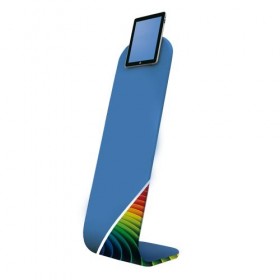
For an iPad stand for trade shows and exhibitions, opt for a model on a weighted base (5–8 kg minimum for stability) with a height of 1.20–1.40 metres for comfortable standing use. A key lock is essential to prevent theft. Make sure the stand is compatible with your specific iPad model. For permanent reception areas, wall-mounted or counter-top models are more cost-effective and equally efficient.

How much does a secure iPad kiosk cost?

A lockable tablet floor stand with anti-theft security costs £250–600 depending on the quality of the mount (materials, design, security features). This does not include the tablet itself (standard iPad from £350–450 minimum). For complete turnkey solutions (kiosk + tablet + pre-installed lead capture app), budget £800–1,500. This investment typically pays for itself within 2–3 trade shows through the volume of leads captured and qualified.

Are iPad stands compatible with all models?

Our stands are compatible with the main iPad models (standard iPad 9.7-10.2", iPad Pro 11" or 12.9", iPad mini 7.9") and most professional Android tablets (Samsung Galaxy Tab, Microsoft Surface). The universal mounting system adapts to different thicknesses and formats. For atypical or recent models, please verify compatibility before ordering or contact our customer service team with the exact reference of your tablet.

What anti-theft security is available for a public iPad kiosk?

Several levels of security are available. 1) Key-locked tablet compartment: prevents visitors from removing the iPad. 2) Anti-pull security cable: a safety loop connecting the stand to a fixed anchor point. 3) Heavy weighted base: prevents unauthorised movement of the entire unit. For very high-risk environments (open public trade shows, department stores), combine all three levels to minimise theft risk.

Does the kiosk require a power supply?

Yes, the tablet kiosk requires a 220V power supply for continuous iPad charging (otherwise the battery will drain within a few hours). The power cable is typically routed discreetly through the stand and plugs into a standard outlet. At trade shows, check whether electricity is included in your stand rental agreement. For very short uses (1–2 hour activations), the iPad battery may be sufficient without plugging in.

Can the post be customised in my company's colours?

Yes, several of our stands can be powder-coated in the Pantone shades of your brand guidelines on request. Allow an additional lead time of 10–15 days and a minimum of 5–10 units for a competitive price. For retail chains and large multi-site rollouts, this customisation ensures perfect visual consistency with your brand identity and significantly enhances the professional image perceived by your visitors or customers.

What application should I use for my lead capture forms?

Several options depending on your needs. Turnkey solutions: Salesforce, HubSpot, Microsoft Dynamics offer lead capture applications optimised for tablets in trade show environments. Custom solutions: bespoke development by a web agency to precise requirements (CRM integration, automatic scoring, personalised branding). Budget-friendly solutions: Google Forms, Typeform work well for straightforward needs. Stand-Direct specialises in supplying hardware and does not provide software services.

What is the delivery time for iPad stands?

Our standard in-stock models (common iPad stands in standard finishes) are delivered within 7-12 business days to France, Belgium, Luxembourg, the Netherlands and Germany. For custom orders (Pantone powder coating, specific configurations), allow 3-4 weeks of production time. For large-scale deployments (commercial tour equipment, agency fleets), a dedicated logistics plan is provided.

Can't find the answer to your question ?

Integrating a tablet kiosk into your commercial strategy

The investment in an iPad or tablet kiosk only delivers returns when it is properly embedded in your commercial strategy. Several core principles help transform this display into a measurable ROI generator.

First principle: define a precise commercial objective. Installing a tablet kiosk "because it looks modern" produces zero return. Conversely, a kiosk dedicated to a clear goal (capturing 50 qualified leads per day at a trade show, interactively showcasing a product launched this quarter, running a customer satisfaction survey at the store exit) generates measurable, actionable results.

Second principle: design an application optimised for kiosk use. A generic mobile app performs poorly on a fixed kiosk (navigation ill-suited to the format, lengthy forms that discourage users). Opt for an application specifically built for kiosk deployment: ultra-short forms, intuitive finger navigation, design optimised for standing use, and an automatic time-out that resets after each user.

Third principle: human activation of the device. A tablet kiosk left unattended generates little engagement. At a trade stand, a sales representative who actively invites visitors to try the kiosk ("Would you like to see our new configurator?") can multiply usage by 5 to 10 times. This human activation is what separates a decorative unit from a genuine commercial tool.

Fourth principle: collecting and leveraging the data captured. The real value of the kiosk lies in the data it gathers. Plan for: (1) a structured data export to your CRM, (2) a commercial follow-up plan for leads within the following 5 days, and (3) periodic conversion rate analysis. Without these three elements, even large volumes of data remain unused.

Fifth principle: physical and software security. The kiosk may hold customer data: ensure GDPR compliance (privacy policy clearly displayed, explicit opt-in, right to erasure). For physical security, locking mechanisms and anti-theft fixings are essential. For a complete event setup, pair the tablet kiosk with a floor-standing brochure holder for printed materials and a roll-up banner for complementary visual communications.

There is 1 product.

Sort by:

Meilleures ventes

Toutes les meilleures ventes ›