Statut en temps réel de votre commande et de votre livraison.
The office accessories range brings together the small-scale equipment that makes a real difference to the comfort and safety of a professional workstation, from ergonomic supports to fixing hardware for partition screens between desks. It is aimed at businesses fitting out or refurbishing offices, open-plan spaces and reception areas, with two goals: reducing postural strain from prolonged keyboard and mouse use, and ensuring partition glass or panels between colleagues are installed securely. These accessories complement existing office furniture without requiring a full replacement, making them a quick, low-cost way to improve a workstation compared with a complete refit.
A poorly adjusted workstation eventually causes strain in the wrists, shoulders and neck, particularly for staff who spend several hours a day at a screen. Ergonomic accessories, such as a suitable keyboard support, correct the typing angle and height to reduce this repeated strain, without needing to replace the desk or chair already in place.
In open-plan offices fitted with glass or panel screens between desks, the right fixing hardware ensures a stable, long-lasting installation, with no risk of coming loose from handling or a light knock. This type of fixing hardware works equally well for desk partitions and for screens at reception or in high-traffic areas.
Choosing an office accessory mainly depends on the actual set-up of the workstation: existing desk height, the type of glass or panel to be fixed, and how often the workstation is used. A business fitting out several dozen identical workstations benefits from standardising on a single support or fixing model, to simplify ordering and maintenance over time.
Most of these accessories fit directly onto existing furniture, with no complex drilling and no need for a building professional. The ergonomic keyboard support installs in a few minutes under the desktop, while the fixing hardware for partition screens attaches directly to the panel being secured.
Designed for daily professional use, these accessories withstand repeated strain without losing stability, unlike consumer-grade equivalents intended for occasional use. This durability reduces frequent replacement and the workstation downtime caused by a failing accessory.
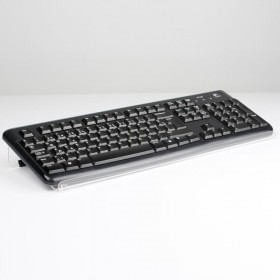
Bent wrists, raised shoulders, a tense neck: a badly positioned keyboard wears a team down little by little. A keyboard riser tilts and positions the keyboard at just the right height, for natural typing that helps prevent musculoskeletal disorders, the leading cause of office sick leave.
A simple accessory, immediately adopted by users, that turns your workplace wellbeing policy into something tangible.
In a flex office, each workstation serves several people: accessories must adjust in one movement and withstand daily handling. Our desk equipment is chosen for exactly that durability, with materials that stand up to the frequent cleaning shared desks require.
Complete the set-up with the office signage and display solutions available on Stand-Direct for a workspace that is coherent from end to end.
The right format depends on available surface and intended use. For an individual desk, choose compact desk organizers and stackable letter trays that keep the work surface clear. At a reception desk, opt for name-plate holders and sign holders in standard A6 to A4 sizes, in acrylic or metal. Document displays come in single, double or triple compartment versions depending on volume. Always measure desk depth and clearance height before ordering to ensure seamless integration and a professional finish consistent with your office fit-out. Modular ranges let you scale accessories as teams and document flows grow.
Yes, most of our accessories can be customized to your visual identity. Acrylic name-plate holders and reception signs take HD digital printing of your logo, contact details or a department pictogram. Organizers and letter trays can be produced in your brand colors. For metal sign plates, laser engraving delivers a durable, premium result suited to reception desks. Customization reinforces brand consistency across the workstation and strengthens the professional impression. Even small runs are possible, making branded desk accessories accessible for offices and showrooms.
The budget varies with material and degree of customization. Plastic desk organizers and letter trays start at a few euros per unit, ideal for equipping multiple workstations cost-effectively. Customized name-plate holders and acrylic plates sit in the mid range, while engraved metal sign plates represent the premium investment, justified by their durability. Bulk orders to fit out an open-space or reception desk benefit from volume pricing, optimizing the overall cost of your fit-out. Request a quote for precise per-unit pricing on customized runs.
For standard accessories such as desk organizers, letter trays and document holders held in stock, shipping is fast, generally within 24 to 72 working hours. Customized items such as printed name-plates or acrylic sign holders require additional production time to approve the proof and complete printing or engraving. Bespoke laser-engraved metal plates typically need the longest lead time. To equip a reception desk or an entire open-space for a specific date, place your order early and confirm the exact lead time when requesting a quote. Express options are available for urgent standard-product orders.
Our accessories are covered by the statutory conformity warranty against any manufacturing or material defect. Designed for intensive use in office environments, organizers and letter trays withstand daily handling, while acrylic and metal plates retain their finish over time thanks to durable materials. Laser-engraved sign holders are particularly resistant to wear and yellowing. If a defect is found on receipt, our customer service quickly arranges replacement or refund, ensuring the reliability of your fit-out. For large installations, we recommend keeping a small stock of spares.
A keyboard placed too low or too flat forces the wrists to bend and the shoulders to rise, creating tension over time. The riser lifts and tilts the keyboard to align the forearm and wrist in a neutral typing position. This simple correction reduces everyday discomfort and helps prevent musculoskeletal disorders at the workstation.
It depends on the model. Some supports are sized for the keyboard alone, while others offer enough surface to also hold the mouse, keeping both hands at the same height. The choice depends on the space available at the desk and how the user works. Our product sheets give the useful dimensions of each support.
Depending on the model, adjustment is continuous or made in set positions, in height and sometimes in tilt. The aim is to achieve horizontal forearms and relaxed wrists, free of tension. Quick, tool-free adjustment is particularly useful on shared desks, where each user adjusts the equipment to their own build in a matter of seconds.
Yes, provided the equipment chosen is sturdy and easy to adjust. In a flexible workspace, an accessory is handled by several people every day and cleaned regularly: it must withstand these demands without loosening or wearing out. Our accessories are selected for this durability, to reliably equip unassigned desks.
Can't find the answer to your question ?
Fitting a workstation with the right office accessories becomes worthwhile as soon as several colleagues report recurring discomfort, wrists or neck, or as soon as an open-plan refit introduces partition screens that need to be fixed reliably. The investment remains modest compared with replacing furniture entirely, which often makes it the logical first step before considering a larger refit. It is particularly justified in high-density environments, call centres, administrative open-plan offices or shared reception areas, where the number of staff affected multiplies the impact of poorly adjusted comfort or safety.
An ergonomic keyboard support is worth prioritising for high-input roles, accounting, customer support, secretarial work, where repeated movement increases the risk of musculoskeletal strain over time. Fixing hardware for partition screens becomes useful wherever a protective panel needs to stay firmly in place in a high-traffic or frequently handled area, a reception desk or a service counter for example, where an inadequate fixing would quickly become a visible weak point.
How well an ergonomic accessory works depends directly on its initial adjustment: a badly positioned keyboard support does not correct posture, it simply shifts the strain elsewhere. It is best to adjust each workstation individually rather than applying a single setting across a whole team, since build and typing habits vary noticeably from one person to another. For partition screens, the fixing should be positioned to spread the load across several anchor points rather than a single one, to prevent any play or tipping over time.
These accessories require little day-to-day maintenance, and regular cleaning is enough to keep them looking good and working well. A periodic check on how tightly the fixing hardware is secured remains useful in high-traffic areas, where repeated handling can gradually loosen a fixing that was not properly checked at installation.
Across a department or a business, the unit cost of an office accessory is low compared with the indirect cost of sick leave linked to a musculoskeletal disorder, or of replacing a partition screen damaged by an unsuitable fixing. Standardising accessories on a single model for all similar workstations also simplifies stock management and one-off replacements, and makes it quicker to swap out a failing item without hunting for a specific reference for each desk.
When budget does not allow for equipping a whole department at once, it is more effective to start with the workstations under the most strain, continuous data entry, prolonged sitting, or with the high-traffic areas where a partition screen takes the most handling. This step-by-step approach makes it possible to measure the real effect of the first roll-out before extending it across all offices, and to adjust the choice of model if early feedback reveals a different need than expected.
Certain mistakes come up regularly when fitting workstations with ergonomic or protective accessories.
Active filters: